
Luxury Hotel
Start with a relaxed friend photo outside a glass hotel entrance. Sheru rests a paw on your shoulder, and the waist-up framing keeps both faces visible. Warm doorway lights complement your everyday outfit.
AI PHOTOS WITH THE WHITE LION BOSS
Upload one selfie and create an AI photo of you and Sheru Bhai together. Choose a hotel, supercar, lounge, auction or wedding scene, or describe your own idea in Custom.
See photo examples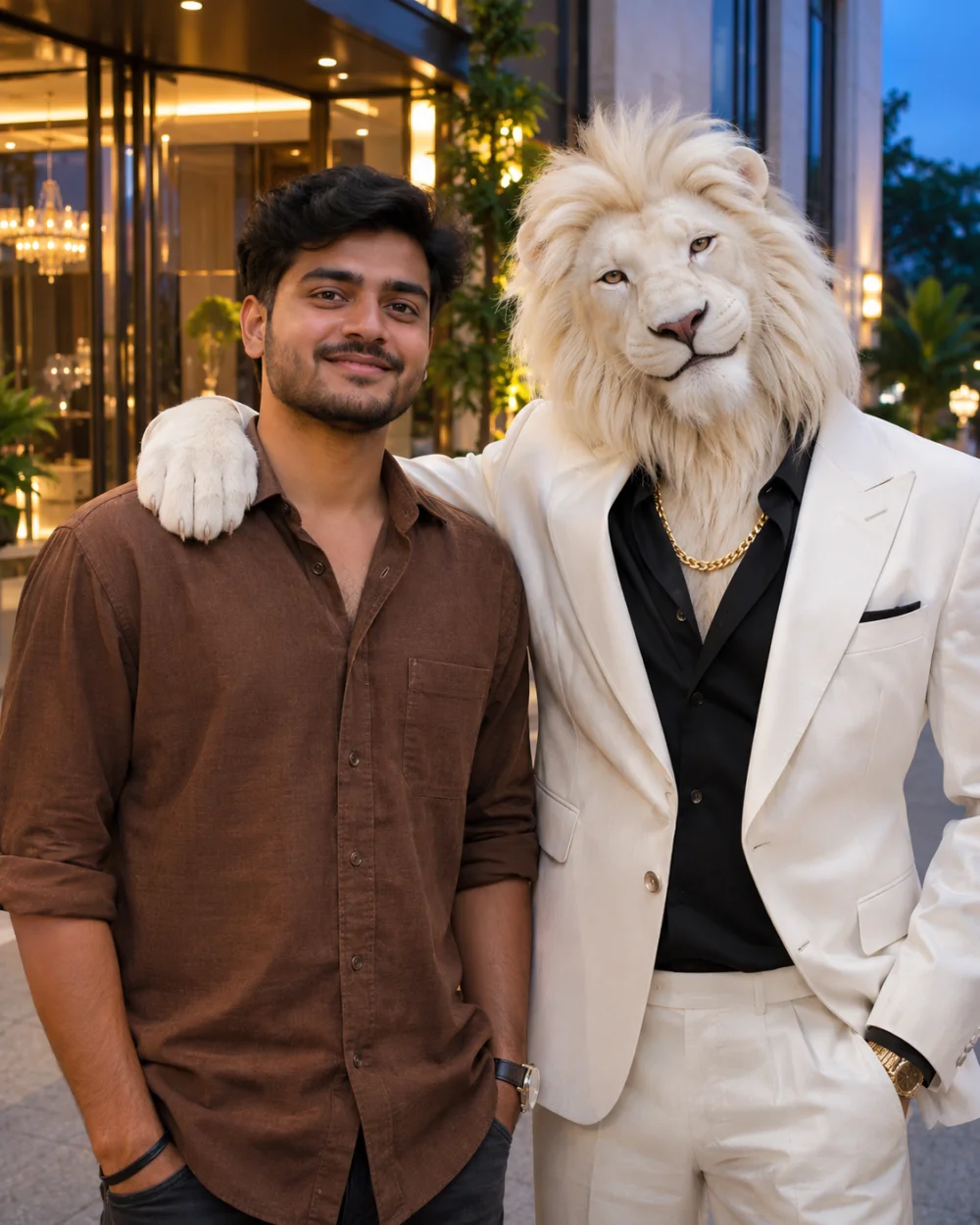
Luxury Hotel
AI-created illustration. Your result will use your selfie.AI-created illustration. Your result will use your selfie.
Compare five ready-made scenes, or use the Custom example as a starting point for your own idea.
Compare the pose, framing and light before choosing a scene. The examples below are AI-created illustrations. Your generated photo uses your selfie and the selected scene, so faces, clothing and other details may differ.
Start with a relaxed friend photo outside a glass hotel entrance. Sheru rests a paw on your shoulder, and the waist-up framing keeps both faces visible. Warm doorway lights complement your everyday outfit.
Walk toward the camera beside Sheru, with a parked black supercar behind you. A low camera angle, streetwear and cool blue night lighting give this full-body photo a movie-entrance feel.
Sit beside the white lion boss on a gold-framed velvet sofa in a dark library. The relaxed seated pose, knitwear and warm reading lamp put the conversation and setting in the frame.
Join Sheru in the front row of an auction. Raise a bidding paddle while he turns toward you with a knowing smile. Red velvet seats and a side-angle composition highlight the interaction.
Meet Sheru at a bright Indian wedding celebration, with festive clothing, marigold flowers and a wrapped gift. One selfie creates a two-person guest photo; you do not need a couple’s reference picture.
Describe your own place, action, clothes and mood in up to 500 characters. Sharing chai is only an inspiration image. Your description could take you to a gaming night, birthday party or another setting.
AI-created scene illustrations. Your face, clothing and scene details may differ in the generated result.
Choose a JPG, PNG or WebP up to 5 MB with one face clearly visible. Select it before signing in and check the upload preview. You can replace it there if the crop or lighting is unsuitable.
Pick a preset for its prepared pose and setting, or describe a different idea in Custom. Choose 4:5 for a portrait or 9:16 for a taller story image. Presets do not need a written prompt.
Sign in, check the credit cost and click Generate My Photo. Your result appears here when ready. Download it or find completed creations in My photos. Each new generation uses credits, even with the same scene.
Your upload is the identity reference for the human in the photo. A clearer reference gives the AI more useful facial detail, but it cannot guarantee an exact likeness.
Try a selfie taken near a window or in soft daylight. Avoid shadows across the eyes, strong beauty filters and distant shots where the face is small. Choose a clear, recent photo that shows facial details.
Keep your eyes, nose and mouth visible in a single-person photo. Sunglasses, masks and hands over the face can make the reference less clear. The selected scene already includes Sheru, so no separate lion photo is needed.
If the face looks unfamiliar, try a sharper, more front-facing selfie. For a different pose, switch scenes or simplify your Custom description. Inspect faces and hands before sharing. A completed image you dislike still counts as a generation.
Choose a monthly subscription, a yearly subscription or a one-time credit pack. Credit packs are selected by default. All five presets and Custom use the same 1K photo rate, and credits already in your account work here too.
One 1K photo uses 20 credits
Starter Pack
For a smaller set of photos across your favorite scenes.
Pro Pack
For more scene variations and different selfie references.
Ultra Pack
For a larger collection of portraits and custom ideas.
Photo counts use the credits included in the selected plan at the current 1K rate. Credit packs are one-time purchases; subscriptions renew on the selected billing cycle. Sign in before checkout and review the billing interval and final amount on the payment page.
Sheru Bhai is a fictional lion-headed boss character used in AI photos and short-video stories. This tool creates an image of you beside a white-lion version of the character. It is an independent creation tool, not an official character website.
Yes. Your selfie is the human identity reference. The tool asks the AI to preserve recognizable features while adding Sheru and the selected setting. Facial details can still change, so use a clear reference and review the result. Exact likeness is not guaranteed.
No prompt is needed for the five presets. Select a scene to use its prepared instructions. For Custom, describe the place, action, clothing and mood in up to 500 characters. The tool adds the character and identity-reference instructions.
Yes. Use Download photo when a successful result appears, or find completed creations in My photos when signed in. Select 4:5 or 9:16 before generating, then check the crop and facial details before sharing the downloaded image.
Generating a photo uses account credits. Welcome credits depend on the current signup offer; check your balance to see what is available. The cost is shown before generation, and Pricing offers monthly subscriptions, yearly subscriptions and one-time packs if you need more.
This page creates still AI photos. Choosing 9:16 produces a taller image, not an animated clip or audio. You can use it as a story image or video cover, and edit the downloaded photo elsewhere if you want to create a video.
One photo at the current 1K setting uses 20 credits, including Custom. The same cost appears beside the generation button and above Pricing. Selecting a scene or viewing an example does not spend credits; starting a new generation does.
Failed tasks return deducted credits through the refund process. Check the task status and your balance before retrying. A successfully generated image that does not match your taste is still a completed generation. Change the reference or scene to try another result.
Your selfie is uploaded and sent to the AI service to create the requested image. Only use photos you have permission to upload. Completed photos are available in My photos. Read the privacy policy for more information about uploaded image handling.
Start with a clear selfie and the hotel scene, or choose the setting that fits your idea. Explore the examples, then return to the generator, check the credit cost and create your photo with the white lion boss.
Generate My PhotoLearn more in our Privacy Policy